


At Anorak we believe interactive video is an interesting and underexplored medium for entertainment. Video diffusion models unlock exciting ways to work with dynamic content, but they typically suffer from two major drawbacks that limit their use in high-quality production: control over the output, and speed of generation.
In this experiment we push at the current limits of these models and share the techniques we use to tighten control and cut end-to-end latency, so we can continuously reimagine a tightly controlled simulation in realtime.
Clockwise from top left: the simulation grid, its OpenGL render, the live output from the model, and the prompt.
The example above shows a continuous stream from a simple, live-updating simulation. We encode its representation into the model's latent inputs and reimagine the world in realtime, while preserving the simulation details that matter (in this case, the positions of some simple buildings for a city-builder style game).
Architecture
First, let’s get something out of the way: a latent diffusion transformer (DiT) can’t produce true realtime. These models work over a set of frames simultaneously, producing a chunk of video in one go. So this architecture will always have some lag, because we always need to buffer and process a chunk at a time.
We can, however, shrink that chunk (the window), optimise the pipeline, and split the work of conditioning and denoising across multiple GPUs so that output chunks are generated faster than new input chunks arrive. The result is a continuous stream that lags behind reality by roughly the window size.
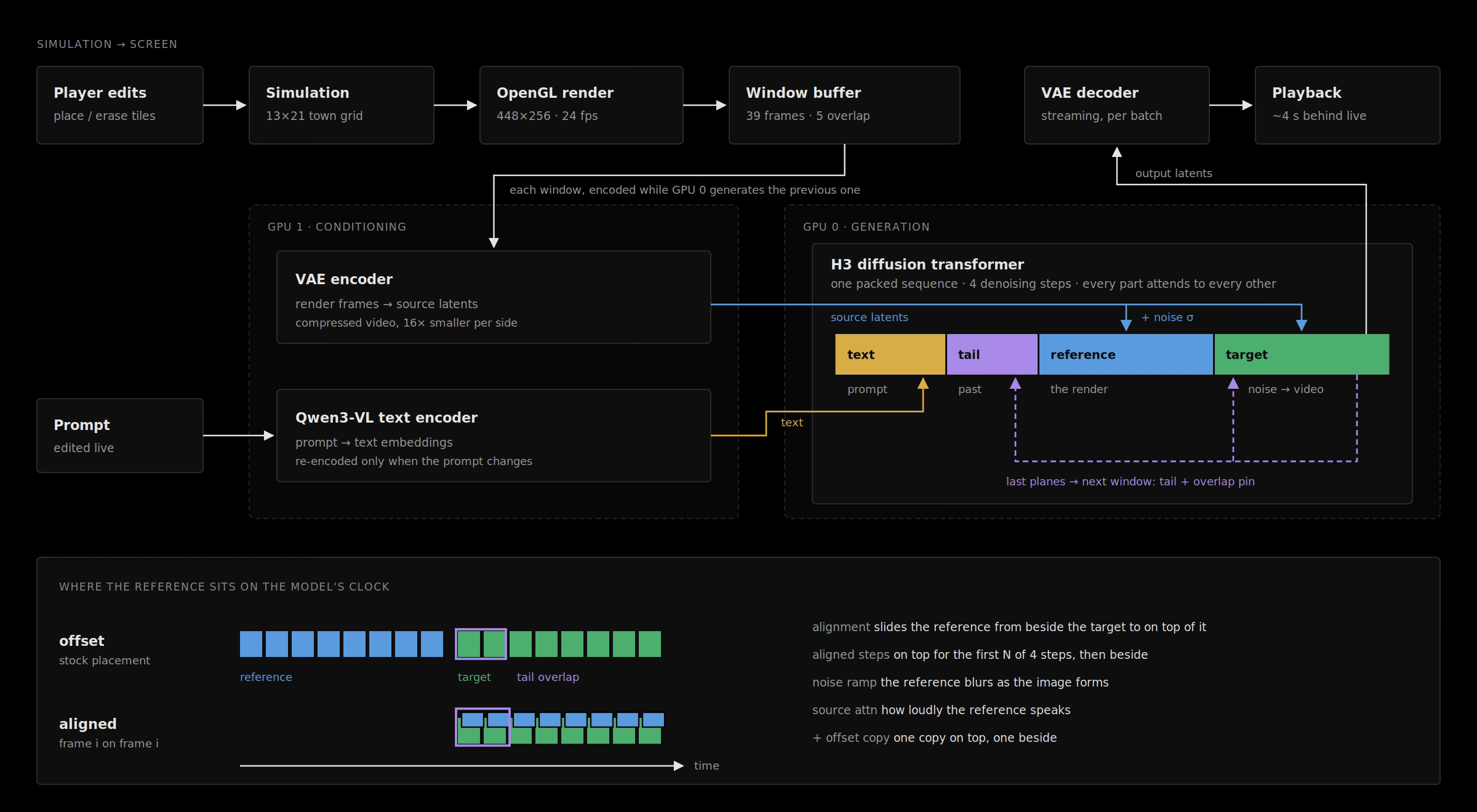
The pipeline: the simulation is rendered into overlapping windows; GPU 1 encodes frames and prompt, GPU 0 runs the diffusion transformer, and the last frames of each output feed the next window.
The problem with smaller windows is that the signal from the simulation we’re trying to reimagine becomes very weak. Our solution is a configurable ‘alignment’ control.
Everything the model looks at gets a position: which frame it belongs to, and where in the frame. By default, the reference is placed before the video being generated, as if it were a separate clip that played earlier. The model has to work out for itself that frame 10 of the reference corresponds to frame 10 of the output.
Alignment puts the reference on top of the output instead: reference frame 10 gets exactly the same position as output frame 10. The correspondence is then built into the positions, so the model doesn’t have to learn it. The technique comes from a patch for training editing adapters (LoRAs, small add-on models) with aligned guides. We use only the placement, with no extra training.
On its own this turns out to be too strong. With full alignment, the stock model is too constrained and has no room to “imagine” anything. So we added ways to find the middle ground:
Alignment tuning: a dial between the two placements. 0 is the stock “separate clip” placement; 100% is exact overlap. In between, the reference sits partly offset.
Aligned steps: pin the layout early, then let go. Denoising runs in four steps; the early steps decide composition and the later ones decide detail. We keep the reference aligned for only the first few steps, then move it back to the offset position, so layout is locked in while materials and texture are left more to the prompt.
Noise ramp: fade the reference out as the image forms. The reference gets progressively noisier with each step, so it guides strongly at the start and weakly at the end.
Source attention: how loudly the render speaks. This directly scales how much weight the model gives the reference compared with everything else it’s looking at. Turn it down and the prompt has more say. At zero, the model can’t see the render at all.
Offset copy: both at once. The reference is given twice: one copy aligned, for frame-by-frame sync, and one in the stock position, for what the scene contains. This pairing comes from the same community work, where the aligned copy kept things in sync and the second copy helped the model make the requested edit. It costs about 40% more compute.
By combining a small window with these optimisations and alignment techniques for turning our simulation into conditioning, we’ve had moderate success getting the model to stick tightly to the simulation while staying within the required budget of one second of generation per second of video.
Editing the simulation produces tightly following output, with ~4 s of latency on an RTX PRO 6000
Keeping long streams stable
Continuous streams present another problem. A continuous stream is really many overlapping windows of generation stitched together, and naively passing the “tail” of the previous window into the “head” of the next creates a feedback loop that leads to degradation.
A pathological case: a looping simulation degrading over time as feedback accumulates with each window.
To mitigate this, we combine a few techniques:
Tail noise, or “how much to trust the past”. Before handing the tail over, we can blur it slightly by mixing in some noise. A clean tail gives strong continuity, but it also carries forward any mistakes or drift, which build up over time. A noisier tail lets the model correct itself, at the cost of more visible joins. It’s a dial between memory and forgetting.
Tail length, or “how much history”. By default the tail is just the overlapping frames. We can also hand over more of the previous window, up to all of it, placed at its real position in time before the new window starts. That gives the model more evidence of what the restyled version looks like.
Tail attention, or “how loudly the past speaks”. The model is also looking at the live render of the town, and in our architecture that render is a much bigger part of its input than the short tail. Left alone, the render wins: the output drifts back towards a fresh reimagining of the simulation, and good restyling achieved in one window fades in the next. Tail attention turns up how much weight the model gives the tail compared with everything else it’s looking at.
Overlap pin, or “holding the past in place”. We write the previous window’s final frames directly into the start of the new window and hold them fixed while the rest is generated, with a configurable strength.
The same case with these techniques: a better image held over longer horizons, even under pathological feedback.
TL;DR
We’ve shown how to produce near-realtime interactive streaming content while keeping enough control over the reimagined output to build coherent experiences.