


Making generated video follow the game: can a simple football game simulation become convincing match-like footage—and without changing the action? We continue to explore different ways in which traditional game development might work alongside interactive generative video.
In this experiment we let a football game simulation determine and indicate what’s happening on the pitch, then task generative video models with deciding how it all looks. I mean, we did give them plenty of pointers…
Getting the desired results here is no small task. Set of tasks, even. We’re asking the model to do three things at once: repeat the play, replace the blockout (rough 3D draft of a game) with the right players and kits, and make the result appear like real footage. What could possibly go wrong?
Quite a bit, as it happens. Spoiler alert.
We’ll take you through what we tried before training a LoRA (a lightweight add-on used to customise AI models without retraining the entire system) specifically for football: the design experiments, the inconsistencies we found, and the questions raised.
The same passage of play: the blockout on the left and an H3 Max output on the right. Both are combined in one six-second video, playing at their original speed.
01 / What we tried
Build the play first then create the imagery
The design question was whether we could keep the logic and responsiveness expected of a modern game [simulation, in this case] while giving the gamer a much richer visual experience. Crucially, the video model shouldn’t decide whether a pass connects or a shot is saved; those variables are dictated by the gameplay.
We started with a deliberately simple blockout. Capsules and boxes indicate and describe player positions, movement and team identity. Both the ball and camera follow the intended passage of play. The generative video model has to supply the human articulation, kits, grass, stadium and broadcast-like videography.

Give the model more than a look.
We paired the motion reference with an appearance sheet (a blueprint for the AI to understand exactly how a character looks from multiple angles and in different poses) and a structured prompt. The sheet describes the broadcast look and team strips while the prompt asks for the action to stay completely synchronised: pass, control, shot, save. It also spells out which blockout shapes belong to each team.
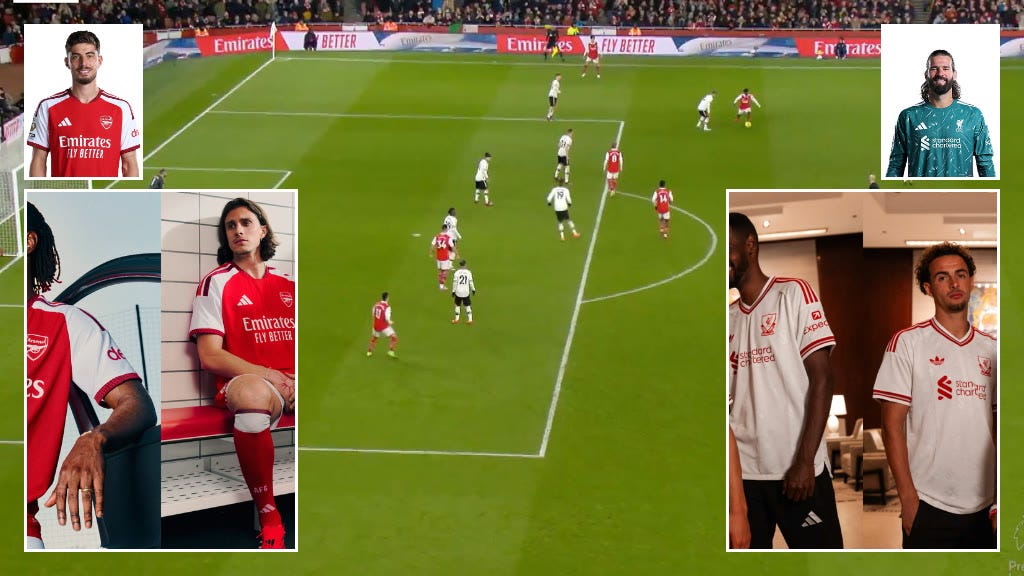
The supplied appearance reference. It describes what the scene should look like; the simulation describes what should happen.
One passage. Five pipelines.
We ran a benchmark comparison test evaluating the performance and quality of different video models and combinations; different deployment methods (running a model locally on our hardware vs. managed cloud services) and contrasting variants of a heavy-duty model against a lightweight version.
Specifically, we compared Minimax H3 on Anorak compute, a turbo variant, hosted H3, hosted H3 Max and Seedance 2.0 Mini. The outputs below are the second-pass (no, not that kind of pass) comparison used in the earlier simulation we showed you. Watch the bodies, ball, camera and background as well as the overall finish.
In order: Source simulation, Anorak original, Anorak turbo (labelled “distill”), hosted H3, hosted H3 Max and Seedance 2.0 Mini. Use fullscreen for a closer look (better on desktop). This is just a one-off example of each pipeline, not a definitive scorecard. Keep in mind that using the same setting number (seed) won’t give us identical videos on different platforms.
02 / What isn’t consistent
Three problems in one generation.
It helps to segment what we are asking the models to do and look at each separately. A clip can look good on one of these dimensions and fall short on another. The difficult part is getting all three to work together.
01
Repeat the play pattern
The runs, pass, first touch, shot and save need to happen as they do in the simulation. Yes, the model can generate a plausible attack… but may change a player’s route, add someone to the scene or reinterpret the action. For a workable game, the footage obviously needs to show the play that follows from the player’s decisions, not some albeit sometimes realistic-looking random action.
02
Replace the players and kits
The blocks need to become people, with the right team identity and kit throughout the clip. In these examples, one output leaves a magenta cylinder on the pitch; another turns it into a person but keeps the magenta. Shirt details and numbers can also vary. Following a shape or colour is only part of the job!
03
Make it feel like real footage
Players need convincing strides, foot plants and contact with the ball and overlapping bodies need to stay separate. The camera, crowd, grass and stadium all contribute to the broadcast feel. Some outputs here have a convincing finish; others lose crowd detail or show unclear limbs. The blockout has no articulated bodies, so the model has to invent much of this, with the help of the appearance sheet.
Getting the play right, the players right and the picture right are separate achievements. To get where we’d want to get to with this, we need them in the same clip. Every time.
That’s the story that’s emerging from this experiment: we can see pieces of the result we’re looking for (which is promising) but asking for the whole transformation in one generation appears to push the limits of these systems. The experiment examples don’t establish that any one task is solved. We also saw variation across reruns, so repeatability remains a question across all three problems (let’s call them challenges 🙂).
A safeguard, with a clear boundary.
Our experiment associates each final video with the settings used to make it: the setup, the choices made, the starting number (seed), and the motion. Playback can compare recorded ball-contact events with the live passage and fall back to the blockout when they diverge.
That check compares event metadata but it doesn’t inspect the generated pixels, detect an extra player (or streaker) on the pitch or verify the kit. It protects the link to the recorded passage but it doesn’t guarantee the footage accurately follows the reference.
One important lesson about comparisons.
When you change both where a model runs and how it is sped up at the same time, it’s hard to tell which one caused the result. In fact, our earlier notes were wrong; degradation that we blamed on the speeding-up method (distillation) actually happened in the standard version, too. Moving forward, we need to test these settings separately.
Lessons learnt and what’s next…
Sticking to the Reference
Using a Control LoRA and locking down keyframes helps stop the AI from drifting away from our source imagery. The main challenge now is keeping the movement natural while freezing player details.Trying a 3-Step Process
Instead of doing everything at once, we might split the work into three steps: one for the motion, one to add the players/kits, and one for the final video look. The risk is that later steps might accidentally mess up the movement or add extra wait time.Deciding What to Train
Instead of trying to fix every glitch with one massive update, we want to train a custom LoRA for just one specific step. This helps us pinpoint exactly where the AI needs the most help.Testing the New Plan
We will test our current method against this new 3-step setup and custom LoRAs. We will score the movement, outfits, and video quality separately, checking the footage after every step to see exactly where it breaks.
What we want to see improve
Play pattern: the intended movement, ball contacts, timing and outcome.
Players and kits: complete replacement of the blockout, with stable identities and team strips.
Footage quality: believable bodies, contact, camera and environment.
All three together: repeatable success across runs and unfamiliar passages, at a practical generation cost.
There’s something very neat about freeing up a designers mind to focus on (game)play / engine and then using a design system to skin it / render it / generate it after the play is established. It’s like mocap… let the actors act and then turn them into blue aliens later. Establish the first principles, focus the energy on that, apply the shiny shiny after.